2025-12-25 16:01:10
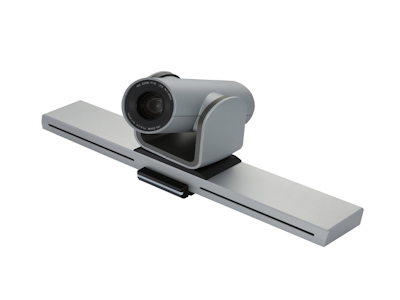
В современном мире бизнеса видеоконференции стали неотъемлемой частью повседневной работы. С ростом удаленной занятости и глобализации компаний, качественная видеосвязь играет crucial роль в обеспечении эффективной коммуникации. Однако выбор подходящей камеры для видеоконференций может быть сложной задачей, особенно с учетом множества доступных опций на рынке. В этой статье мы подробно разберем 10 ключевых факторов, которые должны учитывать бизнес-пользователи при выборе камеры, чтобы максимизировать производительность и минимизировать затраты.
Первым и, пожалуй, самым важным фактором является разрешение камеры. Для профессиональных видеоконференций рекомендуется выбирать камеры с разрешением не менее 1080p (Full HD), а в идеале — 4K, если бюджет позволяет. Высокое разрешение обеспечивает четкое и детализированное изображение, что особенно важно при presentations или обсуждениях, где визуальные details имеют значение. Например, камера с разрешением 4K может передавать мельчайшие нюанты, такие как выражения лиц или текст на документах, что enhances коммуникацию.
Кроме разрешения, обратите внимание на частоту кадров (frame rate). Камеры с частотой 30 кадров в секунду (fps) или выше обеспечивают плавное видео, что reducing размытие при движении. Это critical для динамичных обсуждений или когда участники часто двигаются. Также consider технологии like HDR (High Dynamic Range), которые улучшают цветопередачу и контрастность, making видео более естественным даже при изменении освещения.
Угол обзора камеры определяет, сколько пространства она может охватить. Для небольших meeting rooms подойдет камера с углом обзора 60-90 градусов, которая сфокусирована на нескольких людях. Для larger конференц-залов выбирайте wide-angle камеры с углом 120 градусов и более, чтобы охватить всю комнату без необходимости physical adjustments.
Digital zoom (цифровое увеличение) и optical zoom (оптическое увеличение) — еще два важных аспекта. Optical zoom предпочтительнее, так как он не ухудшает качество изображения при увеличении, в отличие от digital zoom, который может привести к pixelation. Например, камеры с 10x optical zoom позволяют приближать specific участников или objects без потери clarity, что useful для detailed discussions.
Видеоконференции — это не только видео, но и audio. Многие камеры come со встроенными микрофонами, но их quality может vary. Для бизнеса рекомендуется выбирать камеры с noise-canceling технологиями, которые filter out фоновые шумы, такие как typing или street sounds. Это ensures, что голоса participants звучат четко и without distractions.
Если встроенные микрофоны недостаточны, consider камеры с support для external микрофонов или аудиосистем. Некоторые модели integrated с array микрофонами, которые can detect и усиливать голоса из different directions, providing omnidirectional coverage. Это ideal для larger rooms, где participants сидят в разных местах.
Совместимость камеры с popular видеоконференц-платформами, такими как Zoom, Microsoft Teams, Skype, или Cisco Webex, is essential. Убедитесь, что камера supports plug-and-play functionality с этими platforms, чтобы избежать installation hassles. Many камеры certified для specific software, что guarantees smooth integration и reduces technical issues.
Additionally, check for support протоколов like USB, which is widely used и позволяет easy подключение к computers. Some камеры также offer SDK (Software Development Kit) для customization, если ваша компания uses proprietary software. Это позволяет tailored решения для unique business needs.
Простота установки и использования critical для adoption среди employees. Камеры с mounting options like tripod mounts или ceiling mounts provide flexibility для different room setups. Wireless камеры reduce cable clutter, но могут have latency issues, so weigh the pros and cons based on your environment.
User-friendly интерфейсы, такие как remote controls или mobile apps, позволяют легко adjust settings like pan, tilt, zoom (PTZ) без physical contact. Это saves time и enhances user experience. For example, камеры с auto-framing technology automatically adjust the frame to keep participants in focus, reducing the need for manual adjustments.
Выбор камеры от reputable брендов, таких как Logitech, Cisco, Poly (formerly Polycom), или Aver, ensures quality и reliability. These brands have proven track records в индустрии и offer warranties и customer support, which is vital для бизнеса. Read reviews и case studies to gauge performance в real-world scenarios.
Consider the longevity продукта; investing в камеру с future-proof features like support для emerging technologies (e.g., AI enhancements) can save money в long run. Avoid cheap, unknown brands that might have compatibility issues или short lifespans.
Бюджет always a key factor. Цены на камеры для видеоконференций range от $100 для basic models до $1000+ для high-end ones. Determine your needs: для small teams, budget-friendly options like Logitech C920 might suffice, mientras для enterprise-level, consider premium models like Cisco Webex Room Kit.
Factor in total cost of ownership, including maintenance, software subscriptions (if applicable), и potential upgrades. Sometimes, spending more initially on a robust камера can lead to lower costs over time due to reduced downtime и better performance.
В эпоху cybersecurity threats, ensuring that your камера has built-in security features is paramount. Look for камеры with hardware-based encryption, firmware updates, и privacy shutters that physically block the lens when not in use. This prevents unauthorized access и protects sensitive business discussions.
Check if the manufacturer follows industry standards like ISO certifications и provides regular security patches. Avoid камеры that require constant internet connection without proper safeguards, as they could be vulnerable to hacking.
Modern камеры come with advanced features like AI-powered auto tracking, which follows the speaker around the room, или background blur for professional-looking videos. These innovations can enhance the meeting experience и make interactions more engaging.
Other useful features include low-light performance improvements, wide dynamic range for challenging lighting conditions, и integration with other devices like smart displays. Evaluate these based on your specific use cases; for instance, if you often have presentations, a камера with document camera support might be beneficial.
Перед final decision, read user reviews и professional testimonials. Sites like Amazon, TechRadar, или G2 provide insights into real-world performance. Additionally, if possible, test the камера in your own environment to see how it performs with your lighting, acoustics, и network conditions.
Many vendors offer trial periods или demo units; take advantage of these to ensure the камера meets your expectations. This hands-on approach can reveal issues that aren't apparent from specifications alone, such as ease of use или compatibility with existing hardware.
Выбор камеры для видеоконференций требует тщательного consideration multiple факторов, от технических specifications до budget и security. By focusing на these 10 key aspects, businesses can select a камера that not only meets their immediate needs но и supports long-term growth и efficiency. Remember, инвестирование в качественное equipment pays off through improved communication, reduced errors, и enhanced professional image. Start by assessing your current setup, define your requirements, и explore options from trusted brands to make an informed decision that drives success в digital era.
В конечном счете, правильная камера может transform ваши видеоконференции из mundane tasks в productive и engaging sessions. Не underestimate power хорошего visual и audio quality; it can make all the difference в how your business is perceived и how effectively teams collaborate. So, take the time to choose wisely, и вы reap the benefits на years to come.
Предыдущая статья: Громкоговоритель и микрофон в одном устройстве для идеальной коммуникации
Следующий пост: Современные решения для видеоконференций в бизнесе
Shenzhen Oneking Technologies Co., Ltd.
Контактные лица:Shawn
Телефон:1388xx888xx / 1388xx888xx
Адрес:Floor 5, Building 7, (At Gushu Intersection) Rundongsheng Industrial Zone, No. 467, Xixiang Section, 107 National Road, Longteng Community, Xixiang Street, Shenzhen, Guangdong, China